
AQUA WORLD
Aqua World
Put your own taste into a tiny aquarium.
Build it up from bare soil, or decorate a ready-made scene.
A little landscape, built by hand
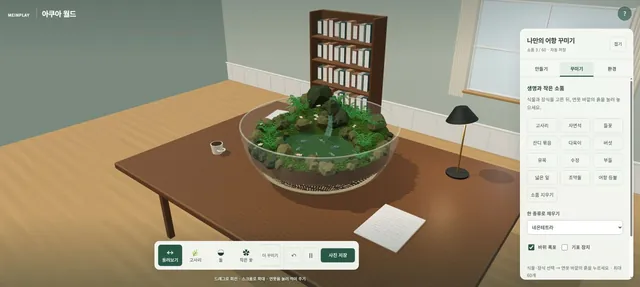
Aqua World is a free 3D web experience where you decorate an aquarium. Choose a vessel, fill the bottom, place stones and plants, then pick your fish. Rotate and zoom with the mouse to enjoy it from every angle.
Getting started
Follow the intro on the first screen. In Build you set up the vessel and substrate; in Decorate you choose plants, props and fish; in Setting you change the room and the light. Pick a plant, then tap the soil outside the pond to plant it.
What can I add?
Three vessel shapes, eight kinds of fish, and props like ferns, wildflowers and stones. Add a waterfall or bubbles, and move the tank to a desk or a dining table. Use Save photo to keep a scene you like.
Can kids use it?
Yes — there’s no score or right answer, just colors, shapes and placement to try. Build different tanks together and talk about your choices. It isn’t an educational simulator of real fish care or ecosystems.
Saving and requirements
No sign-up needed. Auto-save lives in the current device and browser, so shared computers or private windows may not keep your tank. You need a recent browser with 3D graphics; if your phone gets slow or warm, take a break or switch devices.
From an empty container to your favourite view
Prepare the container and base in Build, add rocks, plants and fish in Decorate, then change lighting and surroundings in Environment. Rotate the view to see what is hidden behind decorations and save a photo from your favourite angle.
Frequently asked questions
Where should I place a selected plant?
Tap the soil outside the pond. If you start with an empty container, prepare the base first.
Will my aquarium appear on another phone?
Automatic saving is limited to the current browser and does not sync between devices. Use Save photo to keep a picture of your scene.
Does it teach real fishkeeping requirements?
No. This is a decorating experience, not an accurate model of water quality or compatible fish species.